
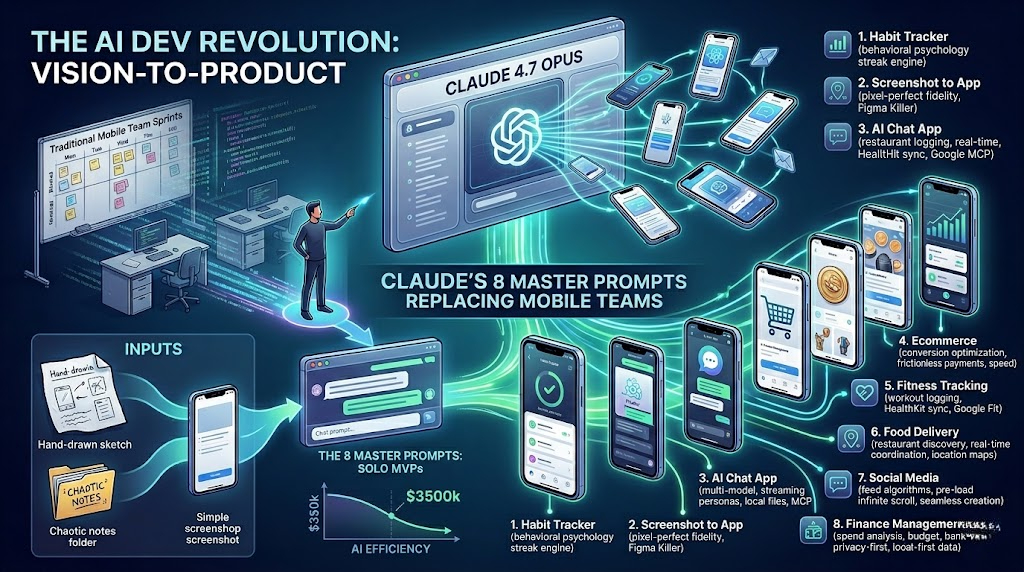
The AI Dev Revolution, How Claude’s 8 Master Prompts are Replacing Entire Mobile Teams
It is May 2026, and the “vibe coding” revolution has officially reached a fever pitch. If you are still waiting three months for a development team to “estimate” a sprint for a basic habit tracker, you are essentially living in the Stone Age.
The narrative has shifted. We are no longer just asking AI to “write a function” or “debug a loop.” With the release of Claude 4.7 Opus and the widespread adoption of Claude Artifacts, we have entered the era of Vision-to-Product. Claude can now take a single screenshot of a UI—or even a hand-drawn napkin sketch—and scaffold a functional, interactive mobile app prototype that looks like it was handcrafted by a senior engineer at Apple.
We’re talking about $350,000-a-year engineering talent condensed into a chat box.
But here’s the kicker: while the “code” is powerful, the real magic lies in the intent. To get senior-level output, you need senior-level prompts. Below are 8 “insane” Claude prompts that are currently disrupting the mobile development lifecycle, allowing solo founders to build MVPs in hours, not months.
1. The Habit Tracker: Behavioral Psychology in Code
Building a habit tracker isn’t hard; building one that people actually use is. This prompt doesn’t just ask for a UI; it asks for a streak engine built on behavioral science.
ROLE: Senior React Native developer specializing in behavioral psychology.
TASK: Build a fully functional habit tracking application with minimal interfaces and bulletproof streak logic.
STEPS: Design the core interface with habit cards, completion toggles, and streak counters. Build a streak engine tracking current and longest streaks. Implement smart notifications that adapt to user behavior.
RULE: Streak data must persist through crashes and device switches. Visual hierarchy must communicate “streak health” at a glance.
Why it works: In 2026, Claude understands state management better than most junior devs. It can handle the complexity of async storage and logic persistence without breaking the “clean” minimalist vibe Apple users expect.
2. Screenshot to App: The “Figma Killer”
This is the “cheat code.” You find a gorgeous design on Dribbble or take a screenshot of a competitor’s app, and you tell Claude: “Make this, but better.”
ROLE: Senior Android and iOS developer specializing in pixel-perfect fidelity.
TASK: Analyze my screenshot and build a functional mobile app that matches every visual and interaction detail.
STEPS: Extract layout components, navigation patterns, and typography. Map every user flow. Wire all navigation with platform-appropriate transitions.
RULES: Design fidelity is non-negotiable. Every component must be built as a reusable element.
Authentic Peer Note: While Claude is a wizard at UI, remember that a screenshot doesn’t show the backend. It’ll build you a stunning frontend, but you’ll still need to tell it to “Build the Firebase connection” next.
3. The AI Chat App: Multimodal Architecture
With every business wanting their own “Custom GPT,” the AI Chat App prompt is the most requested of 2026. This prompt focuses on streaming responses and persona building.
TASK: Build a complete AI chat application with multi-model support and a polished dark interface.
STEPS: Create a model configuration screen for switching providers. Implement streaming responses (word-by-word). Add a system prompt builder for custom AI personas.
RULES: Dark interface only. Message history must persist locally without cloud storage.
Pro-Tip: Ask Claude to use the Model Context Protocol (MCP) if you want your chat app to be able to “read” your local files or calendar in real-time.
4. Ecommerce Mobile App: Conversion Optimization
An ecommerce app that doesn’t convert is just an expensive catalog. This prompt builds for speed and frictionless payments.
ROLE: Senior React Native developer specializing in mobile commerce.
TASK: Build a complete ecommerce app covering discovery, cart management, and order tracking.
STEPS: Create product detail screens with high-conversion “Add to Cart” flows. Integrate Apple Pay and Google Pay.
RULES: Every screen must load in under one second. Cart state must persist without account creation.
5. Fitness Tracking: HealthKit Integration
Health apps are notoriously buggy because of the way they handle background tasks. This prompt forces Claude to handle rest timers and platform-native health syncing.
TASK: Build a fitness app with workout logging and HealthKit/Google Fit integration.
STEPS: Build a workout logger with set/rep tracking. Create an exercise library searchable by muscle group.
RULES: Rest timers must run when the app is backgrounded. All data must sync to health platforms immediately.
6. Food Delivery App: Real-Time Coordination
The “UberEats” clone is the ultimate test of an AI’s ability to handle Map APIs and location tracking.
TASK: Build a food delivery app with restaurant discovery and real-time order tracking.
STEPS: Create a location-based restaurant discovery screen. Build a real-time tracking screen showing driver location.
RULES: Location permissions must be requested contextually. Driver position must update smoothly without “jarring jumps.”
7. Social Media App: The “Infinite Scroll” Logic
Social apps live or die by the “feel” of their feed. This prompt ensures Claude builds a pre-loading engine so the user never hits a “loading” spinner.
TASK: Build a social app with feed algorithms, messaging, and content creation tools.
STEPS: Build an infinite scroll feed with algorithmic ordering. Create a post creation flow supporting photos and videos.
RULES: Feed must feel instantaneous; pre-load content before the user scrolls to the bottom.
8. Finance Management: The “Privacy-First” Fintech
In the era of massive data breaches, the 2026 user wants local-first finance. This prompt builds a “Bank-level” dashboard on your phone.
TASK: Build a personal finance app with spending analysis and budget management.
STEPS: Build a dashboard showing spending, income, and budget status. Create a spending analysis screen with category breakdowns.
RULES: Financial data must never leave the device unless cloud backup is explicitly enabled. Adapt all currency formatting to the device locale.
The Reality of the “$350K Developer”
Can Claude actually replace a $350,000 Apple developer?
The Answer: It replaces the typing, but not the thinking.
When we say Claude “builds” the app, it is generating the React Native or Flutter code and showing it to you in an Artifact. This is a massive leap forward—it eliminates the “grunt work” of building buttons, lists, and navigation. However, the reason senior developers get paid the big bucks is for architectural foresight.
An AI can build you a Food Delivery app in 30 seconds, but you still need a human (or a very well-prompted Agent) to ensure:
- Security: Are your API keys exposed?
- Scaling: What happens when 10,000 people order pizza at the same time?
- Compliance: Are you following GDPR or HIPAA laws?
Claude is the ultimate “Senior Individual Contributor” on your team. It handles the production-level development work while you act as the Product Manager and Architect.
Start “Vibe Coding” Today
The barrier to entry for app development has never been lower. If you have a business idea, you no longer need to raise venture capital just to build a prototype. You need a screenshot and the right role-play prompt.
The “Senior Apple Dev” is now a tab in your browser. Use it.
Stay Connected
Blogs WhatsApp Channel (for daily quizzes and blog updates):
https://whatsapp.com/channel/0029VbCcWME4inotCWmN5511
Telegram Channel (Job Updates & Career Alerts):
https://t.me/careervalore
WhatsApp Channel (Daily Job Updates):
https://www.whatsapp.com/channel/0029Vay7sUV11ulUIhLBUI44
Leave a Reply