
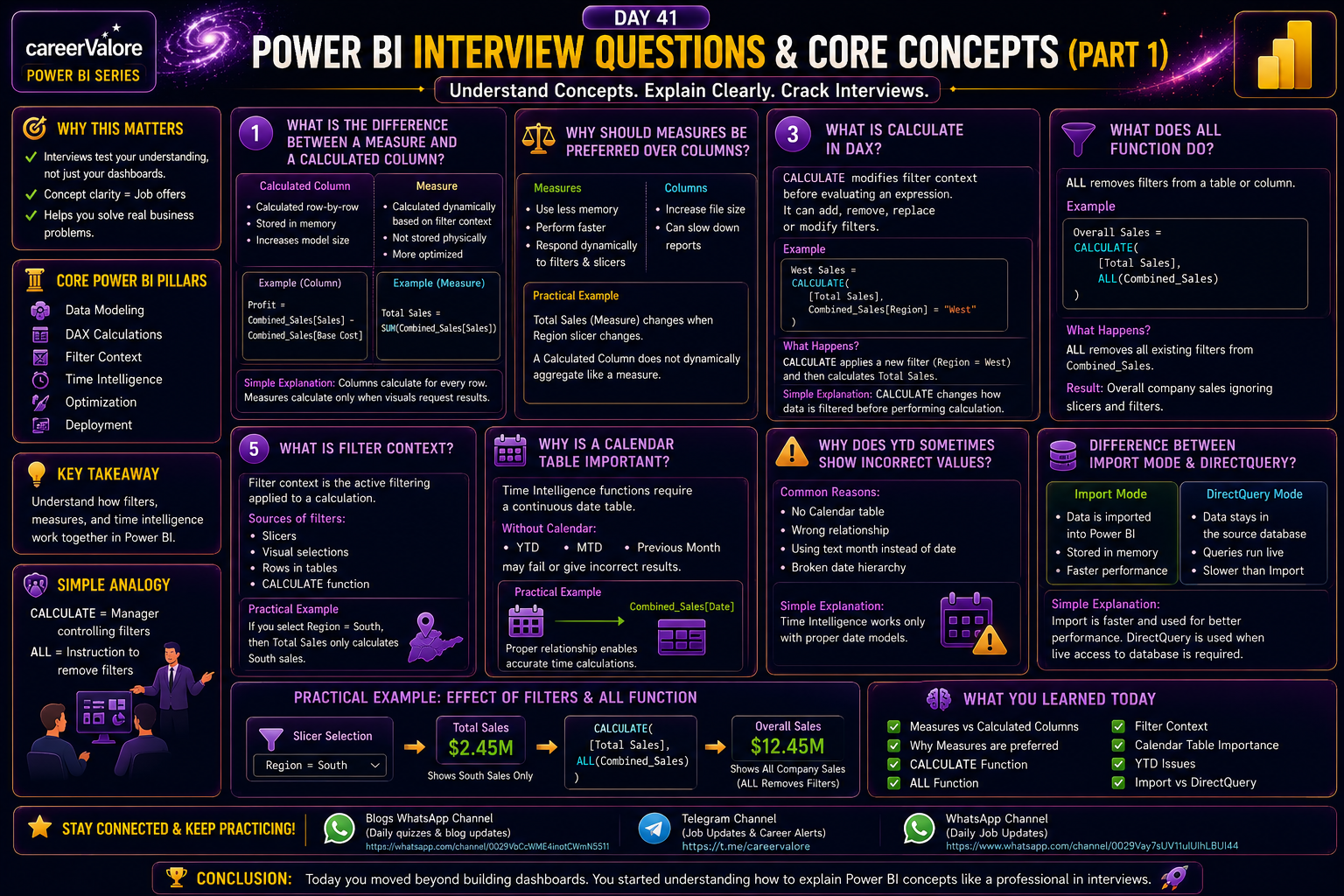
Introduction
You have now completed:
Data cleaning
Data modeling
DAX calculations
Time Intelligence
Dashboard creation
Publishing and optimization
Now comes the next important stage.
Interview preparation.
In real interviews, companies do not only test whether you can build visuals.
They test whether you actually understand:
How Power BI works
Why DAX behaves a certain way
How filters affect calculations
How to solve real problems
In Day 41, you will start learning the most commonly asked Power BI interview questions along with practical explanations using your Combined_Sales and Calendar tables.
What You Will Learn Today
You will understand commonly asked interview questions
You will revise core Power BI concepts
You will learn how to explain concepts clearly in interviews
You will connect theory with practical examples
Why This Skill Matters for Your Career
Many candidates learn Power BI.
But interviews are cleared by people who can explain:
Why a measure behaves differently
Why filters change values
Why Time Intelligence sometimes fails
Understanding concepts is more important than memorizing formulas.
Interview Question 1
What is the difference between a Measure and a Calculated Column?
Answer
Calculated Column:
Calculated row-by-row
Stored in memory
Increases model size
Example:
Profit = Combined_Sales[Sales] - Combined_Sales[Base Cost]
Measure:
Calculated dynamically based on filter context
Not stored physically
More optimized
Example:
Total Sales = SUM(Combined_Sales[Sales])
Simple Interview Explanation
Columns calculate for every row.
Measures calculate only when visuals request results.
Interview Question 2
Why should measures be preferred over columns whenever possible?
Answer
Measures:
Use less memory
Perform faster
Respond dynamically to filters and slicers
Columns:
Increase file size
Can slow down reports
Practical Example
Total Sales measure changes when Region slicer changes.
A calculated column does not dynamically aggregate like a measure.
Interview Question 3
What is CALCULATE in DAX?
Answer
CALCULATE modifies filter context before evaluating an expression.
It can:
Add filters
Remove filters
Replace filters
Modify filters
Example:
West Sales =CALCULATE( [Total Sales], Combined_Sales[Region] = "West")
What Happens Here
CALCULATE applies a new filter:
Region = West
Then calculates Total Sales.
So here, CALCULATE is adding a filter, not removing it.
Simple Interview Explanation
CALCULATE changes how data is filtered before performing calculation.
Interview Question 4
What does ALL function do?
Answer
ALL removes filters from a table or column.
Example:
Overall Sales =CALCULATE( [Total Sales], ALL(Combined_Sales))
What Happens Here
CALCULATE changes filter context.
ALL removes all existing filters from Combined_Sales.
Result:
Overall company sales ignoring slicers and filters.
Most Important Understanding
CALCULATE is the main function controlling filter context.
ALL is one instruction that can be used inside CALCULATE.
Simple Analogy
CALCULATE = Manager controlling filters
ALL = Instruction saying remove filters
Practical Example Using Your Dashboard
Suppose slicer selects:
Region = South
Then:
Total Sales
shows only South sales.
But:
CALCULATE( [Total Sales], ALL(Combined_Sales))
shows complete company sales because ALL removes Region filter.
Final Clarity
CALCULATE changes filter context.
ALL specifically removes filters from filter context.
Interview Question 5
What is Filter Context?
Answer
Filter context is the active filtering applied to a calculation.
Sources of filters:
Slicers
Visual selections
Rows in tables
CALCULATE function
Practical Example
If you select:
Region = South
Then:
Total Sales only calculates South sales.
Interview Question 6
Why is a Calendar table important?
Answer
Time Intelligence functions require a continuous date table.
Without Calendar:
YTD
MTD
Previous Month
may fail or give incorrect results.
Practical Example
Relationship:
Calendar[Date] → Combined_Sales[Date]
This enables proper time calculations.
Interview Question 7
Why does YTD sometimes show incorrect values?
Answer
Common reasons:
No Calendar table
Wrong relationship
Using text month instead of date
Broken date hierarchy
Simple Interview Explanation
Time Intelligence works only with proper date models.
Interview Question 8
Difference between Import Mode and DirectQuery?
Answer
Import Mode:
Data stored inside Power BI
Faster performance
DirectQuery:
Data stays in database
Queries run live
Simple Interview Explanation
Import is faster.
DirectQuery is used when live database access is needed.
What You Learned Today
You revised:
Measures vs Columns
CALCULATE
ALL function
Filter Context
Calendar table importance
Import vs DirectQuery
These are among the most commonly asked interview topics.
Try This Yourself
Open your existing dashboard and explain:
Why Total Sales changes with slicers
Why Growth depends on Calendar table
Why measures are dynamic
Why ALL ignores slicer filters
If you can explain these clearly, you are improving interview readiness.
What Comes Next
Next, you will solve scenario-based interview questions and real debugging problems in Power BI.
Stay Connected and Keep Practicing
Blogs WhatsApp Channel (for daily quizzes and blog updates):
https://whatsapp.com/channel/0029VbCcWME4inotCWmN5511
Telegram Channel (Job Updates & Career Alerts):
https://t.me/careervalore
WhatsApp Channel (Daily Job Updates):
https://www.whatsapp.com/channel/0029Vay7sUV11ulUIhLBUI44
Conclusion
Today you moved beyond building dashboards.
You started understanding how to explain Power BI concepts like a professional during interviews.
Leave a Reply